Wednesday, June 24, 2009

Transformers 2...Too "Hot" for Theaters?


As I'm sure you know, Transformers 2 came out at midnight last night. So, my friends and I all went to the same theater (Edwards Theater) while a few others went to another theater because it sold out before we could all get tickets to the same place. Apparently, the effects in this movie were so "explosive" that it caused the film to BURN about 3/4 into the movie. Yep, I paid $12 / ticket to have Michael Bay not only destroy his sets but also the actual film he deployed his movie on! This wasn't just a fluke either, my buddies over at the other theater reported the same thing about the same time. At the end of the night we heard that it happened in other theaters from people around us! (Did it happen nationwide??)

So, when this burnout happened the whole place started booing and people started leaving to get their money back. I stuck around and the problem was fixed in about 10-15 minutes. When the movie ended, we (the whole theater) got in line to get free movie tickets for the inconvenience.

As for a movie review, I think the projector speaks for itself on how "hot" this movie really is.


Here's an article I found on how the graphics blew up some computers in the production process:
http://scifiwire.com/2009/06/how-the-giant-robot-fx-in.php

Monday, June 8, 2009

Rock Band: Green Day


Green Day just confirmed on KROQ 106.7 that they are making a special Rock Band: Green Day and Billie Joe said it might be out at the end of this year.

Here's to hopes that this is true because this has been a long time coming and there are MANY people who want this to happen.I know I'm one of them.

Thursday, August 14, 2008

Qik: Live Stream From Your Cell


Qik.com is taking YouTubers to the next level. They have developed an application that can record video using your cell phone and then put it up automatically on the internet for the world to see. But what if "automatic upload" isn't fast enough for you. Well, then how about LIVE video? Does that make you happy? It should! Qik does just that and more.

You don't have to worry about taking up space on your phone when you record because it automatically uploads it to your profile (similar to YouTube) and the world can see what you just saw within a few seconds (there's a few seconds delay, but what'd you expect?) Then if that wasn't enough for you you can link Qik to other Social Networks like Twitter, Blogger, YouTube, Pownce, Seesmic, Mogulus, and Justin.tv. And don't worry, you can set some videos to private so only you and your friends can see.

This application works for a long list of cell phones (and of course the iPhone). They are currently working on developing Qik for more cell phones, so if your phone isn't compatible with their application right now, then GET A NEW PHONE! Seriously, this is awesome. Go signup so you'll know when you can get the application as soon as it's available for your phone. NOW! And while you're at it check out the Ones & Zeroes qik group profile. You can view my profile by clicking here or by clicking on my name in the video above.

Oh and "that guy" I refered to in the video is Robert Scoble. Right now he has 800+ Qik videos. Check him out.

Tuesday, August 12, 2008

G-off Loves Apple

So early this morning at around 2:52 AM I came to the conclusion that my iPhone was as worthless as a brick. That's right folks, my iPhone was "bricked" (all it would do was show the Apple logo and stay frozen) after I had just tried to update it to the 2.0.1 firmware at around midnight. I was hit with an Error #1604 (It was partially my fault).

I stayed up scouring the internet for ways to fix it, and every method failed.
The whole day I was panicking because I was iPhone-less. So I called the nearest Apple store and told them the situation - they informed me that their "Genius Bar" was booked until around noon tomorrow. I needed my phone fixed ASAP so I went down there after work and placed my name on the standby list. Within 45 mins I was being helped (that's quick for how busy they were) and because even the Geniuses there couldn't fix it, Apple gave me a brand new iPhone (not 3G, but one just like my old one).

HOW AWESOME IS THAT!?!?

Every time I've gone into an Apple store with some problem; they've fixed it or replaced whatever was the problem - FOR FREE!.
One time my iPhone headphones broke - they replaced them...of course.

...Apple rules...

Monday, August 11, 2008

iPhone 2.0.1 Firmware Jailbroken


Alright, so you can tell already that here at Ones & Zeroes we're big fans of the iPhone. Primarily because we both own iPhones :)

So for those of you that want to keep updating your iPhone and keep it Jailbroken (able to install 3rd party applications that aren't available on the Official App Store) then here is an in-depth tutorial from iClarified.

There you will find how to do it and all the necessary files (the Bootloaders, the 2.0.1 firmware, and Pwnage 2.0.2 application)

Happy Hacking!

Tuesday, July 22, 2008

iPhone 2.0 Jaillbroken!!


OH HAPPY DAY!

Important: If you are going to follow this guide, then read EVERYTHING first, we take no responsibility if you mess up your phone.

Alright, so the PWNage 2.0 tool made by the iPhone Dev Team has been developed for a while, but now it is officially available to the PUBLIC! Which is good news for us jailbroken iPhone users (jailbroken means you can install any iPhone compatible program onto it, not just from the App Store). So now you can enjoy the App Store and enjoy Community Apps (applications made by the general public and by some well known hackers)! The possibilities are endless!! They put up the tool on Saturday and have already released an update (2.0.1) You can get it here. (Side note: only MAC users can use it now - Windows users will have to wait or try this)

When they first put it up on their site for download, they got flooded with downloads and their servers went down (supply and demand). But no worries that's all been fixed.

It's pretty simple to operate this program to jailbreak your iPhone. For a detailed guide to jailbreak click here. (Side note: for people who already have an activated working iphone on AT&T make sure to uncheck "Activate phone" in the Bootneuter section. Or else your phone won't make calls. If you accidently did it, no worries, it can be reversed.)

HAVE FUN!

(any questions? please feel free to ask.)

Friday, July 18, 2008

The Plantronics Discovery 925 Bluetooth Headset - Yes, it's amazing!


If you live in California you're aware of the new "hands-free" law which went into effect July 1. Now under this new legislation, California drivers must use a hands-free device to use their cell phone while driving.

Over the years I have purchased and used my fair share of head-sets, ranging from corded, boomed, and Blue tooth. However, without fail each one of them had their flaws and just was not a sufficient substitute for speaking on the hand-set. Either people couldn't hear me over the roar of the wind and freeway traffic, or I couldn't hear them. The headsets ranged in price from $20-$125, and were all brand-names.

Enter, The Plantronics Discovery 925 Bluetooth Headset, it is everything I've been looking for, and MORE.

1: SOUND QUALITY: Usually when you're on a headset, people know it. Either the headset picks up more background noise, or the caller sounds "distant" from the microphone. Considering that this headset is so small, and barely has any boom, I thought for sure it would pick up background noise like crazy, and make my voice sound distant, but it was the complete opposite. Honestly, my voice and call quality sounded better than holding the hand-set. In the past, I was never able to hear myself speak when talking through a headset, whereas with the Plantronics 925, you can hear yourself come through the microphone loud and clear.

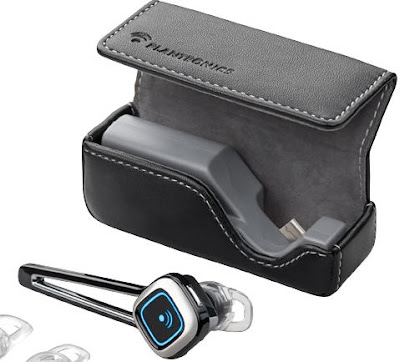
2. BATTERY LIFE: Plantronics has really thought of everything here when it comes to producing a quality headset. As you can see in the picture above, the really nice black leather carrying case also doubles up as a charger. So, if you use all the battery power in the headset, simply plug it into the carrying case/charger, and it will give it a NEW full-charge. Personally, I just put the headset in the carrying case/charger every time I'm not using it, so I have yet to run into any battery problems. Then, when I get home at night, I plug the bottom of the carrying case/charger into my computer USB port or wall outlet, and it charges overnight. I'm sure it would last several days to a week without recharging, but I usually charge all my other peripherals overnight anyways, so its not an issue.

3. COMFORT/STYLE: Since this headset is an in-ear device, you have to not mind having something in your ear while talking. Personally I like this better than the over-the-ear devices, due to the less amount of moving parts and form-factor. Plus, I think I get better sound quality by having it in-ear, instead of a small speaker sitting on the outside of my ear. Plus, I've owned 3-4 Motorola headsets that go over the ear, and after a few weeks to a month it started sitting on my ear weird, and the little flap started becoming less sturdy. If your ear is a funky shape, Plantronics gives you 3 extra different looking cushions, to ensure that it fits nicely and securely in your ear.

4. PRICE: The MSRP of this headset is $149.00, OUCH! However, there are a lot of retailers out there that sell it at almost half the price. For example, NewEgg.com, which is where I purchased mine from (received it in 2 days), sells the headset for $79.99--worth every penny!

In conclusion, if you are thinking of purchasing a headset, and are willing to spend up to $100 for a great quality device, you should seriously consider the Plantronics 925.

UPDATE: I've noticed that it works great for talking, but sometimes when I try to use the Visual Voice-Mail feature on my iPhone, it sometimes doesn't pick-up the connection, because technically it is not a voice-call. However, I'm sure the next iPhone firmware update will fix this.

Documistic.com: Marketing Made Easy


Documistic automates the management and distribution of a company's marketing campaign - making the Marketing Manager's job EASIER! What you do is upload all your templates for your employees to have immediate access to your flyers and postcards that you use everyday in your marketing, and let them have easy access to customize the personal info on the templates to fit their needs. It even offers the service of sending out the flyers for you!

Here's a visualization provided on the website of how the system works:

Great part is, it's a SAAS (Software-As-A-Service) platform that's run on the site, so that means no software to download and install.

So if you're a Marketing Manager (or someone who handles this stuff), Documistic will take out the mundane tasks of collaborating and let you get to focus on the rest of your job.

(I am a current employee of documistic. This is not a way of advertising for the company, but I am merely presenting it as an interesting, new idea to some out there. It definitely was new and interesting to me when I found out about it.)

Thursday, July 17, 2008

African Playstation War

"Toward Freedom", a site dedicated to advancing human rights, released an investigative report on how Sony could have added fuel to a 10-year conflict in Africa's Democratic Republic of Congo. Sony's huge manufacturing needs required a rare metal called coltan. Coltan becomes a bluish-gray powder called tantalum after it has been refined. Tantalum can withstand extreme heat, so manufacturers use it to make electric capacitors. You and I both know that Sony and other manufacturers needed a lot of electric capacitors so the need for tantalum sky rocketed. In 1999, tantalum cost $49 / pound. In 2 years, it shot up to $275 / pound.

Researcher David Barouski commented:


[The] PlayStation 2 launch... was a big part of the huge increase in demand for coltan... SONY and other companies like it, have the benefit of plausible deniability because the coltan ore trades hands so many times from when it is mined to when SONY gets a processed product, that a company often has no idea where the original coltan ore came from, and frankly don’t care to know. But statistical analysis shows it to be nearly inconceivable that SONY made all its PlayStations without using Congolese coltan.

Now how does this tie to the war? This huge demand for coltan by Sony and other personal electronics manufacturers led Rwandan troops and Western companies to exploit the people and mineral resources of Congo, with prisoners-of-war and children often forced to work in mines. The Rwandans were shooting it out for the mines, which contained deposits of cobalt, uranium, gold and, of course, coltan. The estimates of the war’s dead range from hundreds of thousands to several million.

Sony ensures us that they are now taking steps to make sure that they do not use coltan illegally mined from Congo.

Thursday, July 10, 2008

iPhone 2.0 Firmware Early???


That's right, folks. Someone has found the early release of the iPhone 2.0 firmware. Right here ( iPhone1,2_2.0_5A347_Restore.ipsw) People are actually using this as we speak and are downloading apps from the App Store!

Now before you do install this on your iPhone, you need to know that it's not the official release. You can either install it now and be the "cool" kid on your block by getting your grubby hands on it first, or you can wait patiently for the official release coming soon. Also this firmware upgrade will delete all your personal data before it updates itself (dont worry it'll make a backup of your data, but make sure you have enough room on your computer to hold all of). And if you have a "unlocked" iPhone, it will become "locked" -at least until the hacking community fixes that :) Now a bit of warning, Apple has something to say about firmware updates.
"Normally if you choose to update, the iPhone or iPod touch software is updated but your settings and media are not affected. If your device currently has a software version prior to 2.0 (1.x) and you are updating to software version 2.0 or later, all data on your device will be erased in order to perform install the new software. In this case, iTunes will offer to create a one-time media backup of your device depending on what content is on your device and what content is stored in the iTunes Library you are connected to. You should ensure that you have enough free space on your Mac or PC to accommodate a backup that matches the capacity of your iPhone or iPod touch (4 GB, 8 GB, 16 GB, or 32 GB) if you proceed with the this backup."
So that being said, to install this on your iPhone you will have to do it manually in iTunes version 7.7 by pressing the Option key (Shift if you're using Windows) when pressing the "Check for Update". Then select the .ipsw file manually. (If your download is a ".zip" file, rename it to ".ipsw" beforehand).

 
Design by F.W.T.
Web Statistics